Look at the changelog for Photoshop 27.6 and you’ll see the usual Adobe blockbuster moves: Reflection Removal, Gemini 3.1 inside Generative Fill, Firefly Image 5, dynamic text on curves. Standard April update. But buried in the release notes is the most quietly radical thing Adobe has shipped in years — a feature called Rotate Object that turns flat 2D layers into objects you can spin in 3D space. The trick under the hood? Gaussian Splatting. The same technology that’s been the obsession of capture nerds and 3DGS Twitter for two years just landed in the most-used image editor on the planet, and almost nobody is talking about it.

The Story
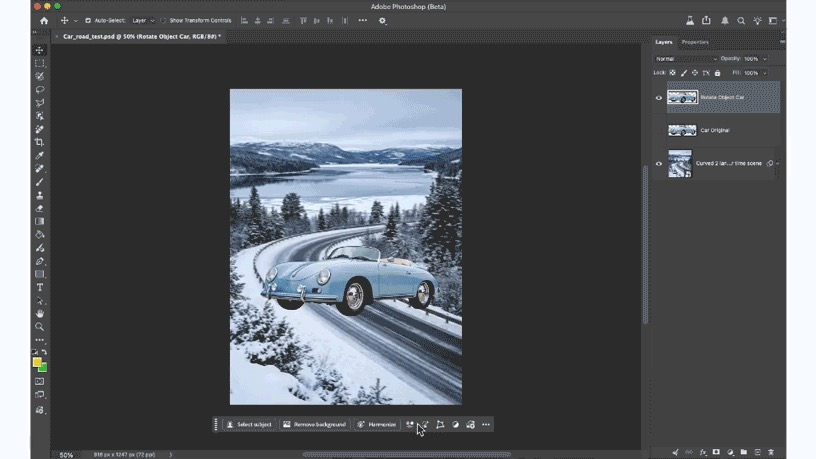
Rotate Object debuted in Beta on March 24, 2026 and went GA in version 27.6 on April 28. You select a 2D cutout — a chair, a person, a coffee cup — and Adobe’s model builds an internal low-resolution Gaussian splat of that object in the background. You drag a gizmo on the canvas, the splat rotates in real time, and when you click Done the system upscales the rotated splat back into a clean 2D layer matching your original resolution. There’s even a Harmonize step that re-lights the rotated object to match the background’s shadows.
The Adobe Research credits read like a who’s who of generative 3D: Yiwei Hu, Zhiqin Chen, Mathieu Gaillard, Yifan Wang, Zifan Shi, Kalyan Sunkavalli. These are the same people publishing top-tier SIGGRAPH papers on neural shape modeling and PBR generation. They didn’t drop a research demo. They shipped it inside Photoshop.
Why You Should Care
Until now, Gaussian Splatting lived in a specific cultural lane: capture rigs, NeRF refugees, Cesium streaming demos, the occasional Unreal plugin. Powerful, but niche. The audience was developers and 3D nerds, not the 30-million-strong Photoshop installed base.
What just happened is different. Adobe didn’t market this as “3DGS in Photoshop.” They marketed it as a tool that lets you rotate stuff. The splat is invisible. The user never thinks about it. And that’s exactly when a technology graduates from research to infrastructure — when it becomes the engine no one mentions, like JPEG or H.264. Splats just became the JPEG of 3D, exactly as the Khronos Group’s KHR_gaussian_splatting glTF extension in February 2026 quietly predicted.
For creative technologists this is a turning point. The hardest sell for any 3D-AI workflow has always been: where does the output land? An OBJ from Tripo, a splat from Luma, a mesh from Rodin — all great, all dead-ends unless your downstream pipeline accepts them. Photoshop accepting splats internally means every art director, retoucher and matte painter on Earth now has a 3D-aware compositing tool. They don’t need to learn Blender. They don’t need to render a turntable. They click, drag, done.
The implications for adjacent fields are bigger than the feature itself: photo retouchers can fix a misaligned product shot without re-shooting; concept artists can dial in a hero pose mid-comp; matte painters can re-orient a building plate without rebuilding it in Maya. None of those people will ever utter the word “Gaussian.” That’s the point.

Try It / Follow Them
- Update Photoshop via Creative Cloud to 27.6. Photography Plan ($29.99/mo) gets you in. Each Rotate Object operation costs ~20 generative credits in beta — confirm in your panel.
- Read the Adobe Research write-up: Rotate 2D objects in three dimensions.
- CG Channel’s full breakdown: Adobe releases Photoshop 27.6.
- Adobe community release notes: Photoshop v27.6 is live.
- Watch the team: Kalyan Sunkavalli (Adobe Research) for the deeper neural-rendering pipeline.

IK3D Lab Take
Two weeks ago we wrote about Cesium streaming 110 million splats to a browser. Last week SpAItial dropped Echo-2. Yesterday Niantic shipped SPZ V4.0 — a better splat compression codec. The pattern is impossible to miss: 3DGS is consolidating into infrastructure, and the Photoshop integration is the moment it crossed into the consumer creative stack. The question for the next year isn’t “will Gaussian Splatting matter?” — that’s settled. The question is which other Adobe tools (Illustrator? After Effects? Premiere?) get a splat-powered feature next, and how long until Figma, Canva and Procreate follow. We’ll bet on After Effects before the end of 2026.
The most underrated Adobe quote in the research note: “Rotate Object is an example of the newest generation of Adobe’s AI tools, which are designed to give creators more capabilities and more precise control over their work instead of replacing the creative process.” Translation: the splat is a tool, not a director. That’s the right framing — and it’s why this matters more than the next Firefly version bump.